Golden Times MT4 EA Settings Explained (Full Guide)
If you’ve ever installed a Forex EA and felt overwhelmed by dozens of settings – you’re not alone. Most traders either leave default settings untouched or randomly tweak values without fully understanding the impact.
That’s risky.
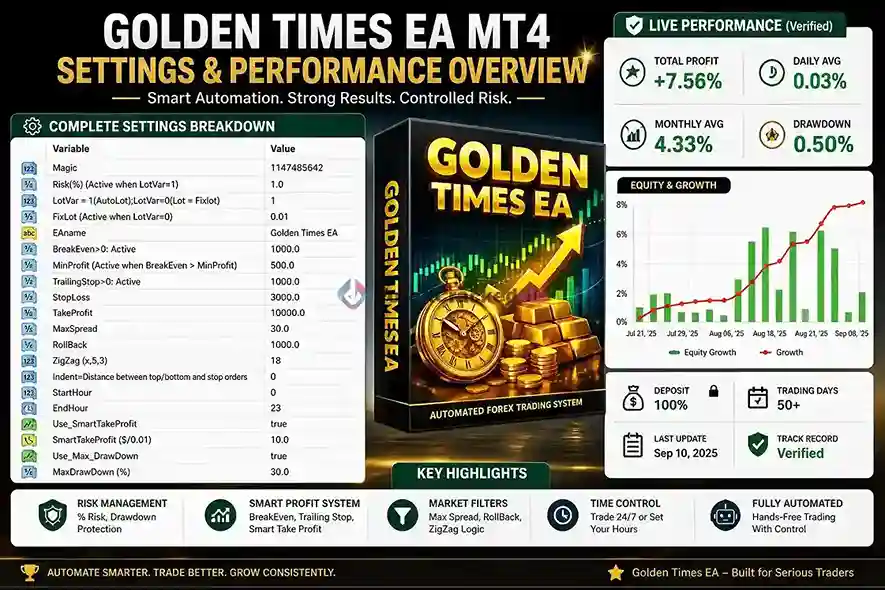
In this guide, we’ll break down the Golden Times MT4 EA settings panel (based on the actual interface image) and explain what each parameter really does, how it affects your trading, and how you can optimize it for better performance.
By the end, you’ll understand this EA like a pro – even if you’re just starting out.
➡️ Golden Times MT4 EA Download: Available on Download
➡️ Telegram Support: Join for updates, announcements, and support
Golden Times MT4 EA Settings Breakdown
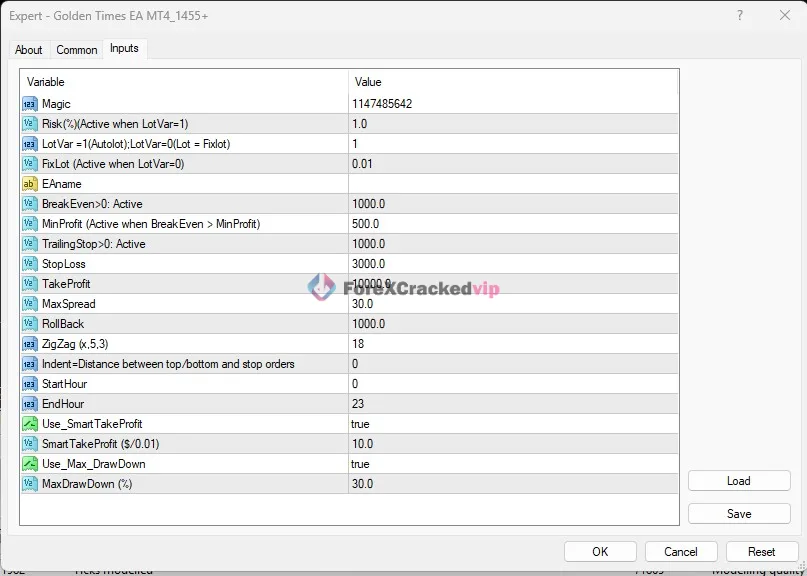
>==Golden Times MT4 EA Download Now==<
Lot & Risk Management
1. Risk(%) (Active when LotVar=1): 1.0
This defines how much of your account balance is risked per trade.
👉 Example:
-
- 1% risk = very safe
- 3-5% = aggressive
📌 This is one of the MOST important settings.
2. LotVar = 1 (AutoLot), LotVar = 0 (Fixed Lot)
-
- 1 → Auto Lot (Risk-based)
- 0 → Fixed Lot
👉 Currently set to Auto Lot
3. FixLot (Active when LotVar=0): 0.01
Only applies if fixed lot is used.
👉 Since LotVar = 1, this is inactive.
Profit Protection System
1. BreakEven > 0 Active: 1000.0
Moves stop loss to break-even after reaching a certain profit.
👉 Helps:
-
- Protect profits
- Reduce risk exposure
2. MinProfit (Active when BreakEven > Min Profit): 500.0
Minimum profit before break-even activates.
👉 Prevents early break-even triggers.
3. TrailingStop > 0 Active: 1000.0
Activates trailing stop after profit hits 1000 points.
👉 Locks in profit dynamically.
Trade Exit Settings
1. StopLoss: 3000.0
Maximum loss allowed per trade.
👉 Large SL suggests:
-
- Swing trading approach
- Room for price movement
2. TakeProfit: 10000.0
Maximum profit target.
👉 Combined with trailing stop → flexible exits.
Market Conditions Filters
EA will not trade if spread exceeds 30.
👉 Critical for:
-
- Avoiding bad entries
- Preventing slippage losses
2. RollBack: 1000.0
Controls pullback logic before entry.
👉 Likely used to:
-
- Confirm retracement
- Improve entry timing
Indicator Logic (ZigZag)
1. ZigZag (x,5,3): 18
Used for detecting highs/lows.
👉 Helps EA:
-
- Identify market structure
- Find entry zones
2. Indent = Distance between top/bottom and stop orders: 0
Distance between order placement and price levels.
👉 Set to 0 = immediate placement
Time Filters
1. StartHour: 0
2. EndHour: 23
EA trades 24 hours.
👉 Can be optimized for:
-
- London session
- New York session
📌 Tip: Restrict hours for better performance.
Smart Profit System
1. Use_SmartTakeProfit: true
Enables dynamic take profit system.
2. SmartTakeProfit ($/0.01): 10.0
Profit target per 0.01 lot.
👉 Example:
-
- 0.01 lot → $10 TP
- 0.10 lot → $100 TP
📌 Scales profit with lot size automatically.
Drawdown Protection
1. Use_Max_DrawDown: true
Enables account protection.
2. MaxDrawDown (%): 30.0
Stops trading if drawdown reaches 30%.
👉 This is a critical safety feature
📌 Prevents account blow-up.
How This Tool Improves Trading
Here’s where Golden Times EA stands out:
✅ Risk-Controlled Automation
- Uses percentage-based risk
- Adjusts lot size automatically
✅ Smart Profit Handling
- Break-even + trailing stop combo
- Dynamic take profit
✅ Market Filtering
- Spread control
- Time control
- Pullback logic
✅ Capital Protection
- Drawdown limit
- Stop-loss enforcement
👉 In real trading:
-
- You avoid overtrading
- Reduce emotional decisions
- Maintain consistent risk
Golden Times MT4 EA Best Use Strategy
To get the best results from these settings:
1. Recommended Setup:
-
- Risk: 1-2%
- Max Spread: 20-25
- Trading Hours: London + NY only
- Drawdown Limit: 20-25%
2. Optimization Tips:
-
- Use Auto Lot (LotVar=1) for scalability
- Lower StopLoss for scalping accounts
- Adjust ZigZag value for market conditions
- Combine with VPS for stable execution
3. Pro Tip:
👉 Always backtest before going live.
Pros and Cons
✅ Pros:
- Strong risk management system
- Flexible settings for all trading styles
- Built-in drawdown protection
- Smart TP & trailing system
- Beginner-friendly configuration
❌ Cons:
- Requires optimization for best results
- Default settings may not suit all brokers
- High StopLoss may not fit small accounts
- Needs VPS for stable performance
Golden Times MT4 EA Final Verdict
The Golden Times MT4 EA is a well-structured trading robot that prioritizes:
- Risk control
- Smart profit management
- Account safety
It’s not a “set and forget” magic system – but if used correctly, it becomes a powerful trading assistant.
👤 Best for:
- Traders who value controlled automation
- Beginners learning EA trading
- Users who want built-in risk protection
👉 If you’re serious about automated trading, this EA is worth testing – especially with proper optimization.
Frequently Asked Questions (FAQs)
1. What is Golden Times MT4 EA?
It’s an automated trading bot for MT4 that executes trades based on predefined strategies and settings.
2. Is it safe to use?
Yes, especially with drawdown protection and risk settings enabled.
3. What is the best risk setting?
1-2% per trade is recommended for long-term stability.
4. Can beginners use this EA?
Yes, but understanding settings improves results significantly.
5. What does Smart Take Profit do?
It adjusts profit targets based on lot size automatically.
6. Should I use default settings?
Not recommended. Always optimize based on your broker and strategy.
7. Does it work on all currency pairs?
It depends on strategy – best to backtest each pair.
8. Do I need a VPS?
Yes, for stable and uninterrupted trading performance.