




What is the EA SouthEast MT4?
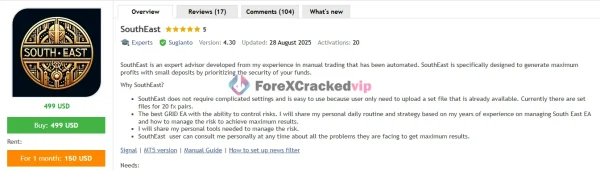
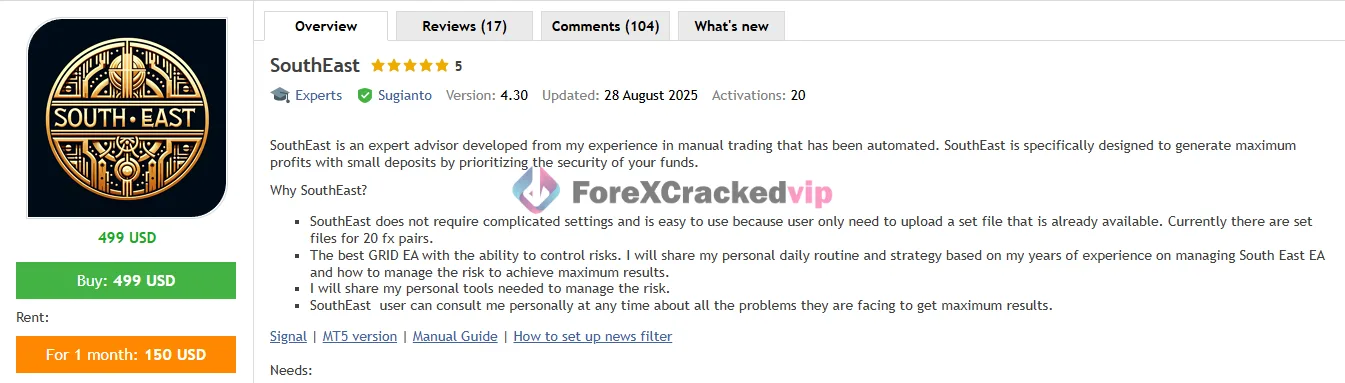
EA SouthEast MT4 is a fully automated Expert Advisor for MetaTrader 4 built around a recovery-style trading model. In simple terms, it looks for price opportunities using virtual trade logic, then manages positions with a blend of grid recovery, mild martingale, trailing functions, and account protection tools. The product page describes it as a robot made to aim for strong profit potential while still putting attention on capital safety, and it is currently listed as version 4.30 for MT4.
What makes this EA stand out is that it is not sold as a “set and forget miracle bot.” Its appeal comes from the fact that it includes a wide range of controls for traders who understand that grid systems need discipline. Instead of relying on one simple signal indicator, SouthEast uses virtual trade measurement, multi-symbol control, drawdown limits, time filters, holiday control, and news filtering to decide how it behaves in changing market conditions.
➡️ Vendor Website: Available on the official product page | MQL5
➡️ Telegram Support: Join for updates, announcements, and support
EA SouthEast MT4 Review
EA SouthEast MT4 has gained attention because it combines an aggressive recovery engine with more thoughtful protection tools than many basic grid robots. The official product details highlight features such as max drawdown limitation, virtual stop loss and take profit, news filter, time control, money management, and smart multi-symbol control, which gives the system a more serious structure than a plain martingale bot.
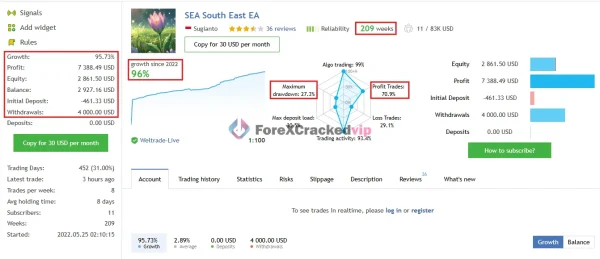
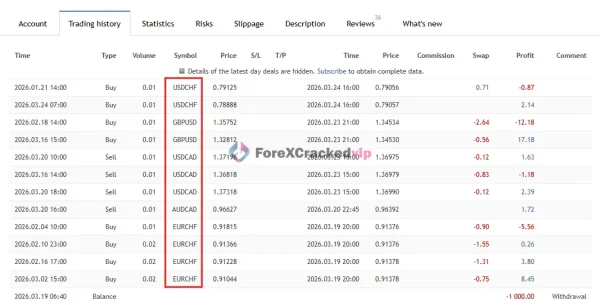
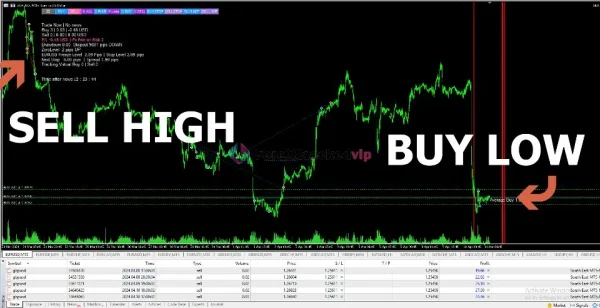
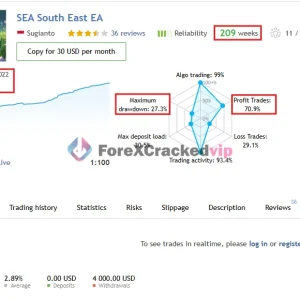
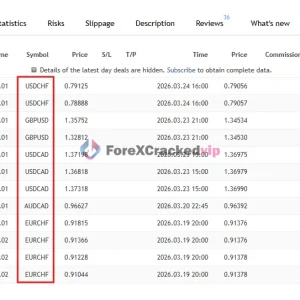
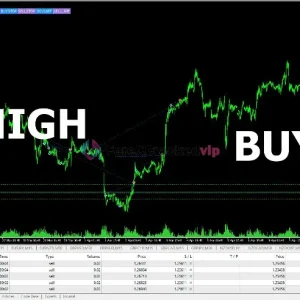
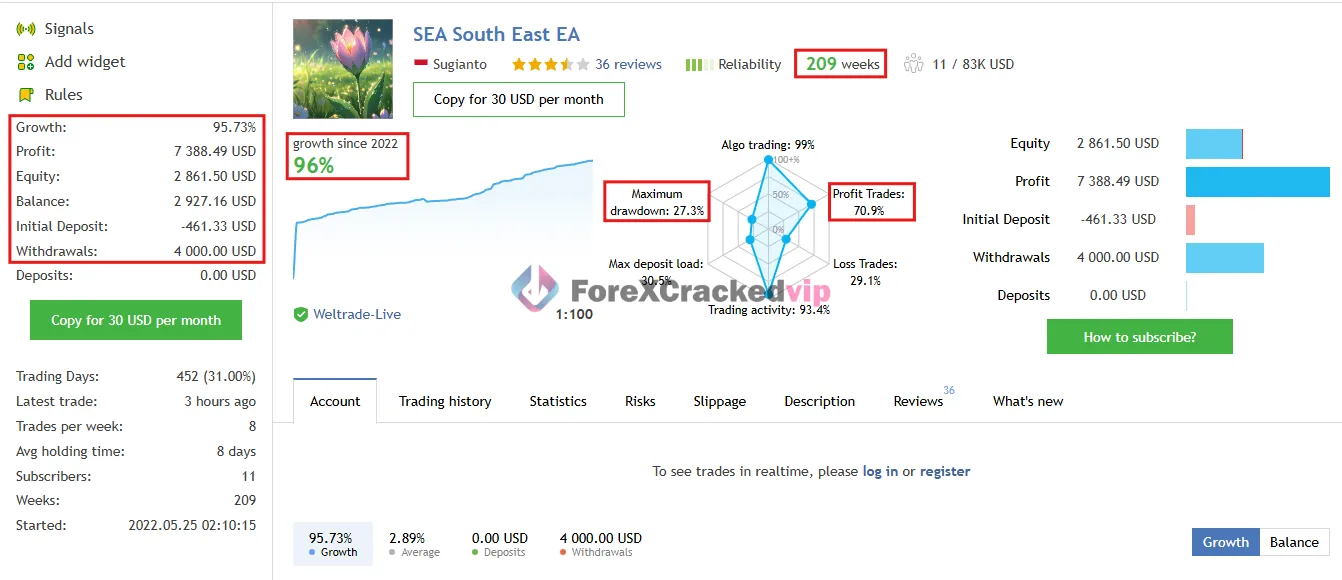
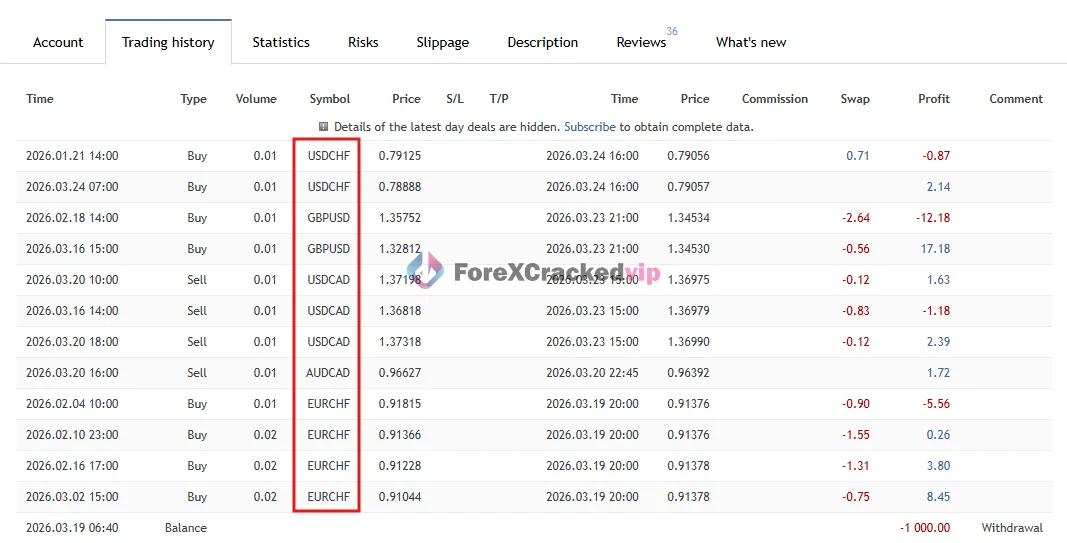
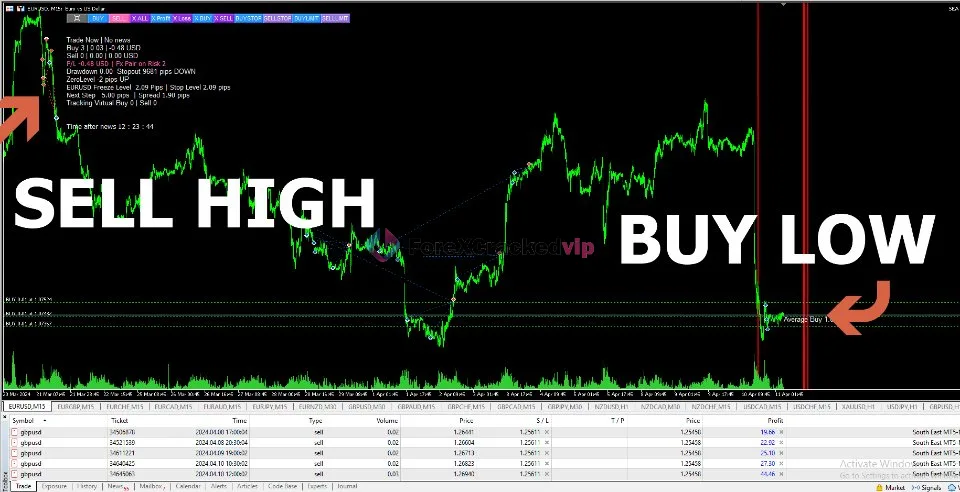
From the provided screenshots, the tool also presents itself with a live-signal style profile showing long-term operation, 200+ weeks of history, positive overall growth, and active trade statistics. The screenshots also show that it works across multiple symbols like USDCHF, GBPUSD, USDCAD, AUDCAD, and EURCHF, which supports the idea that this EA is built for portfolio-style usage rather than a single-pair approach. The chart image further reinforces its core behavior: it tries to sell stretched highs and buy depressed lows, then manage recovery through structured entries.
EA SouthEast MT4 MQL5 Live Signal – 209 Weeks | Check Live
-
Gain: +96%
-
Drawdown: 27.3%
-
Profit: $70.9
Quick Review Highlights
• Platform: MT4 Expert Advisor.
• Current version shown: 4.30.
• Trading style: Grid + mild martingale + virtual trade logic.
• Supported timeframes: M15, M30, H1.
• Supported markets: Multiple forex pairs plus XAUUSD and XAGUSD.
• Risk tools included: Drawdown limit, account protection, close partial, trailing, holiday control, time control, and news filter.
• Ease of setup: Uses set files, which helps reduce manual setup complexity.
• Best suited for: Traders who understand recovery systems and want more control over risk than a typical martingale EA.
General Impression
The strongest side of EA SouthEast MT4 is not that it promises impossible perfection. Its real strength is that it openly works in a grid-recovery category while still giving the trader meaningful safety switches. That makes it more practical than many bots that only chase profit curves without enough account defense.
Key Features
• Virtual Trade Entry Logic
SouthEast uses virtual trade measurement to help detect better entry areas instead of depending only on visible indicator signals. This is one reason the seller says classic backtesting does not fully reflect real behavior.
• Grid Averaging System
The EA can add positions in a structured way to improve average entry price during adverse movement. This is part of its recovery mechanism.
• Mild Martingale Function
It uses a softer martingale approach to accelerate recovery while attempting to keep risk more controlled than a pure high-step martingale strategy.
• Maximum Drawdown Limitation
The robot can stop opening new positions once a drawdown threshold is reached. This is one of its most valuable protection features.
• Account Protection by Money or Percentage
Traders can set cut-loss protection based on drawdown in cash terms or percentage terms. That helps prevent unlimited exposure.
• Virtual Stop Loss / Take Profit
SouthEast includes virtual SL and TP logic, which is promoted as a way to avoid obvious broker-side visibility of protective levels.
• Trailing Function
Trailing is used to secure floating profit and improve exit efficiency once price moves in favor of the basket or trade.
• Close Partial / Drawdown Reduction
It can partially close losing positions to free margin and reduce pressure during difficult market phases.
• News Filter
The EA can avoid trading around high-volatility news periods, which is helpful for a strategy that can suffer during sharp directional spikes.
• Smart Multi Symbol Control
Instead of allowing unlimited pair exposure, the system includes control over how many symbols are traded at once.
• Holiday and Time Control
Traders can avoid certain trading days, market sessions, or uncertain periods.
• Set File Support
The product provides ready-made set files for many symbols, which makes starting easier for traders who do not want to build inputs from scratch.
Trading Strategy Used
EA SouthEast MT4 uses a trend-reversal recovery strategy.
The easiest way to understand it is this: the EA tries to find places where price has stretched far enough to create a reversal opportunity. The provided review image even visually reflects this idea with the simple concept of “sell high” and “buy low.” Instead of blindly entering, the system first uses virtual trading data to observe price behavior and decide where entries may make sense. After that, it manages the position with a recovery framework that includes grid spacing, averaging, and trailing logic.
So the core logic can be broken into four parts:
1. Detect a stretched price area – The EA looks for a reversal-style setup.
2. Open a first position – The initial entry is based on the internal logic of virtual trade observation.
3. Manage bad movement through recovery tools – If price moves against the first trade, SouthEast can use grid entries and mild martingale sizing to improve basket recovery.
4. Exit through profit management – Trailing, close partial, and TP handling help secure gains or reduce exposure.
This is why SouthEast can be effective in ranging or mean-reverting conditions, but it can also face pressure in strong one-way trending markets. That is exactly why the drawdown controls, symbol limits, and time/news filters matter so much.
Why Traders Use This Tool
• It automates a complex trading style
Manually managing grid recovery across several pairs is difficult. This EA handles it automatically.
• It supports many symbols
SouthEast is designed for multi-pair trading, giving traders more portfolio flexibility.
• It includes real risk controls
Many recovery EAs only focus on entries. SouthEast also includes account defense features.
• It is easier to start with set files
Traders can load preset configurations instead of building everything manually.
• It offers both fixed lot and auto lot management
That allows different users to choose between tighter control and automated scaling.
• It can avoid unstable periods
News filter, holiday control, and time control make the EA more adaptable.
• It appeals to traders with small-to-medium accounts
The product description says it was designed to pursue strong profits on smaller deposits, though sensible capital sizing is still important.
• It has responsive-product appeal
Reviews on the product page mention that users appreciated the developer’s answers and support.
Settings & Customization
One of the most useful things about EA SouthEast MT4 is that it is not locked into one rigid mode. Traders can adjust several important settings to shape how aggressive or conservative the robot behaves.
📌 Main settings traders should pay attention to
• Lot Size / Auto Lot
You can usually choose fixed lots for tighter control or auto lot for balance-based scaling. New users often do better with smaller fixed risk at first.
• Max Drawdown Limit
This is one of the most important settings. It tells the EA when to stop adding exposure. Lower values generally mean better account protection.
• Grid Distance / Step Controls
Wider spacing can reduce position clustering but may slow recovery. Tighter spacing can recover faster but increases pressure.
• Martingale Risk
Since this EA uses mild martingale, traders should keep this area conservative if they want longer-term account survival.
• Trading Session / Time Control
You can define when the EA is allowed to work. Many traders prefer stable market hours and avoid thin liquidity periods.
• News Filter
This can help reduce exposure during major news spikes, which is useful for reversal and recovery systems.
• Maximum Number of Active Symbols
Multi-pair trading is attractive, but too many open baskets at once can overload the account. Limiting pair count is often a smart move.
• Account Protection in Money or Percent
This lets traders define a hard line for acceptable loss. It is a must-use feature, not something to ignore.
📌 Practical setup advice
For most traders, the smartest approach is to begin with:
• small lot size,
• limited number of pairs,
• strict drawdown cap,
• demo or cent-account observation first.
That gives you time to understand how SouthEast behaves before moving to a more aggressive setup.
EA SouthEast MT4 Installation Guide
1. Download the EA SouthEast MT4 file and any provided set files.
2. Open your MetaTrader 4 platform.
3. Click File → Open Data Folder.
4. Open the MQL4 → Experts folder.
5.Copy the EA file into the Experts folder.
6. If preset files are included, copy them into the Presets folder.
7. Restart MT4 or refresh the Navigator panel.
8. Open a chart on one of the supported pairs.
9. Choose the recommended timeframe such as M15, M30, or H1.
10. Drag the EA onto the chart.
11. Enable AutoTrading.
12. Load the correct set file for that symbol.
13. Adjust lot size, drawdown limit, trading time, and risk settings.
14. If using the news filter, make sure all required permissions and settings are enabled as instructed by the EA documentation.
15. Start on demo first and monitor trade behavior before going live.
Free Support & Setup Help – Contact us 👉 Telegram Support
How to Setup EA SouthEast MT4 – Complete Step-by-Step Guide (2026)
Final Verdict
EA SouthEast MT4 is a strong fit for traders who specifically want a multi-pair MT4 recovery EA with more depth than a basic martingale robot. Its biggest advantage is not just that it can average into trades. Many EAs do that. Its real advantage is that it also brings drawdown limitation, account protection, time controls, news filter, virtual trade logic, close partial functions, and symbol management into one package.
That said, this is still a grid and mild martingale system. So it should be treated with respect. Traders who ignore risk limits, overtrade too many pairs, or use oversized lots can still put their accounts under heavy pressure. In other words, the EA can be powerful, but it works best in the hands of someone who understands that recovery systems need careful boundaries.
Who should use it?
- Traders who want an automated MT4 EA
- Traders comfortable with grid-based logic
- Users who value set files and flexible controls
- Traders who want to trade multiple forex pairs from one strategy approach
Who should be cautious?
- Traders looking for ultra-low-risk passive trading
- Beginners who do not understand drawdown behavior
- Anyone planning to run aggressive lots on a small account
Overall, EA SouthEast MT4 is best viewed as a feature-rich recovery EA for experienced or careful intermediate traders. Used with discipline, it offers a more structured and better-protected approach than many simple grid robots on the market.
Frequently Asked Questions (FAQ)
1) What is EA SouthEast MT4 used for?
EA SouthEast MT4 is used for automated forex trading on MetaTrader 4. It is designed to find reversal-style opportunities and manage trades with grid recovery, mild martingale, trailing, and risk-control features.
2) Does EA SouthEast MT4 work on many currency pairs?
Yes. The product details show support for a wide range of forex pairs, and even metals like XAUUSD and XAGUSD. That makes it suitable for traders who prefer multi-pair deployment instead of one-symbol trading.
3) What timeframe is best for EA SouthEast MT4?
The listed supported timeframes are M15, M30, and H1. Many traders will test each pair with the provided set files first and then keep only the combinations that match their risk comfort.
4) Is EA SouthEast MT4 a martingale EA?
It uses a mild martingale approach, not a pure extreme martingale style. It also combines that with grid recovery and account protection tools, which is part of why traders find it more structured than many basic recovery bots.
5) Is EA SouthEast MT4 safe for live trading?
It can be used live, but only with careful risk settings. Because it is a grid-recovery EA, safety depends heavily on lot size, drawdown limits, pair selection, and how many symbols you run at once.
6) Can beginners use EA SouthEast MT4?
Beginners can install and run it, especially because set files are available, but they should still start on demo. A trader should first understand how drawdown, averaging, and recovery work before using larger capital.
7) Why does backtesting not always reflect real results?
The product information explains that SouthEast uses virtual trade data and multi-symbol limitations that affect real-time behavior. Because of that, historical testing alone may not show the same behavior seen in live operation.
8) Does EA SouthEast MT4 include risk management tools?
Yes. It includes features such as max drawdown limitation, account protection, close partial, money management, time control, holiday control, and news filter. These tools are important because the EA uses a recovery-based strategy
Best Alternatives
AI Correlation EA 2024 MT4 – MYFXBook 493% Gain + SetFile | Low DD | Unlimited
A strong 2026 alternative for traders who want high growth with controlled drawdown. Its correlation-based trading style makes it attractive for users looking for a more diversified MT4 EA with ready-to-use set files.
POSEIDON EA MT4 – MYFXBook 41% Gain + SetFile | Unlimited
POSEIDON EA MT4 is a balanced 2026 option for traders who prefer steady performance over aggressive risk. With verified growth and included set files, it suits users looking for a simpler and more stable automated trading approach.
Gecko EA MT4 – MYFXBook 57% Gain + SetFile | Unlimited
Gecko EA MT4 stands out as a reliable 2026 alternative with solid verified gain and practical risk handling. It is a good fit for traders who want an MT4 EA that aims for consistent results without overly complex setup.
EA SouthEast MT4 Free Download (FREE for VIP Members)
You can download the EA instantly from our website.
Want unlimited access to 500+ premium Forex robots?
👉 Become a VIP Member:
🔗 https://forexcrackedvip.com/memberships/
VIP Members get:
- Unlimited EA downloads
- Premium indicators
- Lifetime access
- Weekly updates
- Priority support
Explore our MYFXBook products, discover trusted low drawdown EAs, and browse powerful forex indicators to improve your trading setup. You can also check our recommended brokers and recommended VPS for a smoother trading experience.


-
 Sale!Original price was: $1,548.00.$49.99Current price is: $49.99.
 -
 Sale!Original price was: $854.00.$49.99Current price is: $49.99.
 -
 Sale!Original price was: $1,554.00.$49.99Current price is: $49.99.
 -
 Sale!Original price was: $149.00.$39.99Current price is: $39.99.

Reviews
There are no reviews yet.