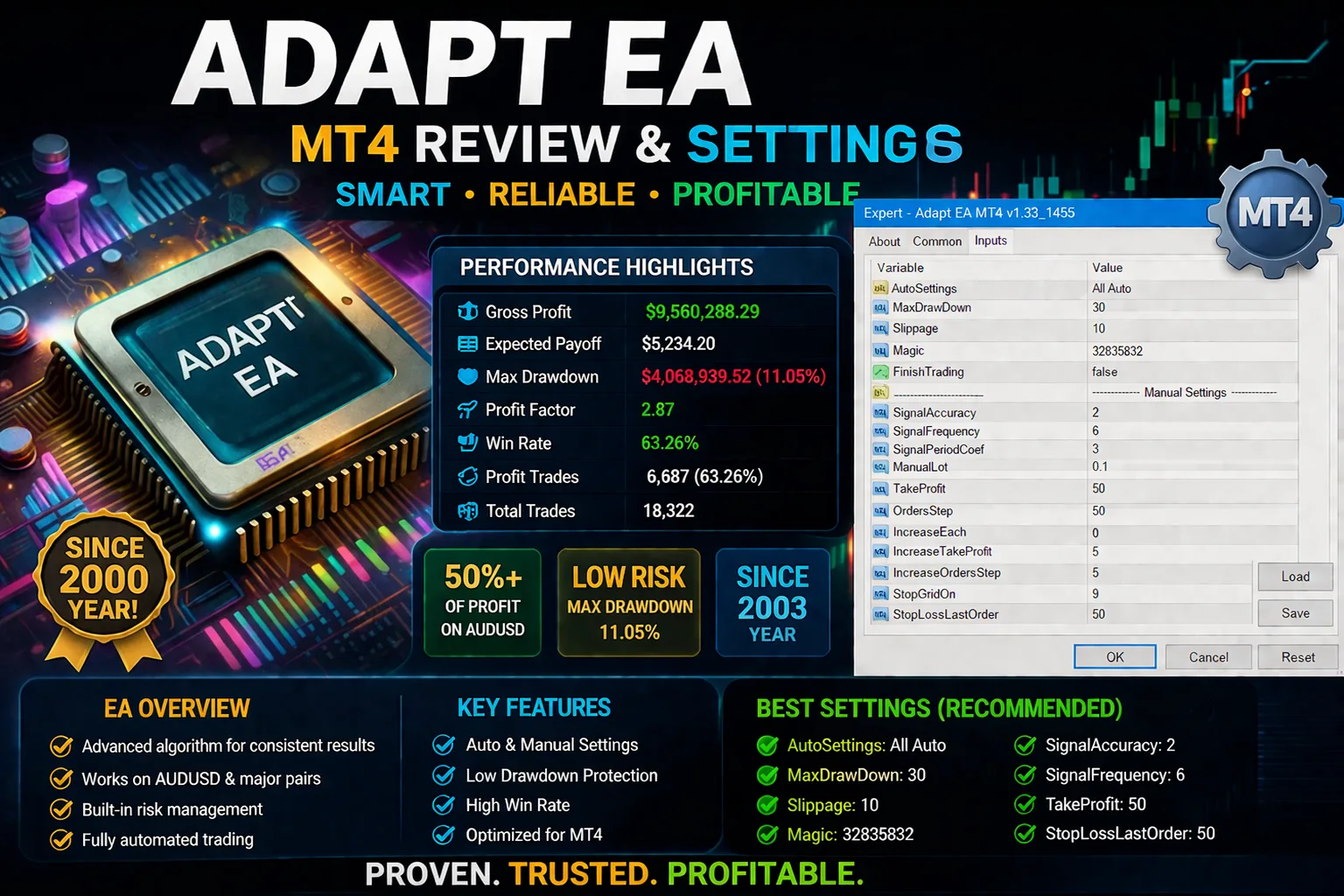
Adapt EA MT4 Review & Settings (2026 Guide)
Adapt EA MT4 looks like a semi-flexible grid/scaling-style EA with auto and manual control options. The biggest strength is flexibility; the biggest risk is drawdown growth when settings are too aggressive. If you are disciplined with risk, demo-test first, and keep lot sizing conservative, it can be usable. If you expect “set and forget” with no drawdown periods, this is probably not the right EA style for you.
What is Adapt EA MT4?
From the input screen, Adapt EA MT4 appears designed to:
- Run in Auto mode for specific pairs (the screenshot notes auto support starts with USDCAD, EURUS…).
- Allow manual tuning of signal behavior, lot size, grid step, and exit logic.
- Use parameters like OrdersStep, IncreaseOrdersStep, and StopGridOn, which are typical in EAs that add/manage multiple positions.
That means this EA is not only about entry quality. Your capital protection settings matter more than entry settings over the long run.
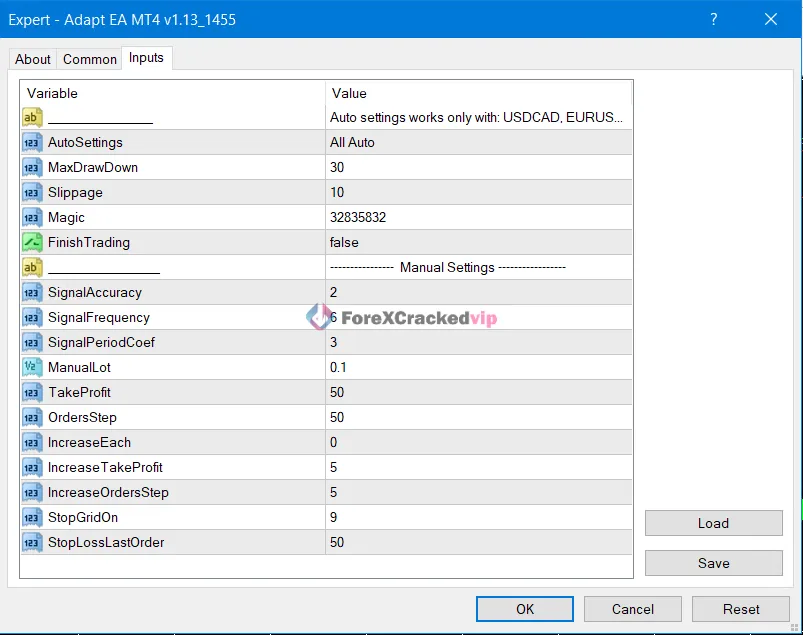
Adapt EA MT4 Settings pannel
🔹What each key setting means (practical view)
- AutoSettings (All Auto): Lets EA choose behavior automatically (usually pair/session logic).
- MaxDrawDown (30): Safety threshold. If interpreted as percent, 30 is still high for small accounts.
- Slippage (10): Max acceptable execution deviation; higher values can help fills in volatility but worsen entries.
- Magic: Unique ID so EA tracks its own trades.
- FinishTrading (false): EA can continue opening/handling trades.
- SignalAccuracy / SignalFrequency / SignalPeriodCoef: Entry/filter sensitivity block.
- ManualLot (0.1): Base lot in manual logic; this is aggressive for many small accounts.
- TakeProfit (50): Target distance (likely points/pips depending broker digits/EA logic).
- OrdersStep (50): Distance between additional orders in a sequence.
- IncreaseTakeProfit (5): Expands TP target as sequence evolves.
- IncreaseOrdersStep (5): Widens spacing for next orders.
- StopGridOn (9): Stops adding new grid orders after count threshold.
- StopLossLastOrder (50): Last-order protection stop.
🔹Safer interpretation of settings pannel
- The strongest protection knobs here are MaxDrawDown, ManualLot, OrdersStep, and StopGridOn.
- If account size is limited, reducing lot size usually protects more than tweaking entry filters.
- Always verify whether values are in points or pips on your broker before going live.
Adapt EA MT4 Best for
- Traders who understand MT4 EA risk management.
- Users willing to run forward tests on demo first.
- Accounts with enough margin buffer for multi-order behavior.
- Traders who prefer adjustable parameters over “black box” EAs.
Adapt EA MT4 Not ideal for
- Beginners expecting consistent daily profits with no losing cycles.
- Very small accounts with high lot settings.
- Traders who cannot monitor drawdown periods.
- Anyone unwilling to stop trading when market structure changes.
Adapt EA MT4 Pros & Cons
🔹Pros
- Good manual control through key risk and progression inputs.
- Auto mode available for supported symbols.
- Useful guardrails such as drawdown limit and grid-stop threshold.
- Can be adapted for different risk profiles.
🔹Cons
- Multi-order logic can escalate exposure quickly.
- Wrong lot-step balance can damage small accounts fast.
- Parameter complexity can confuse new users.
- Performance can vary heavily by broker spread, execution, and market regime.
Adapt EA MT4 Risk and value assessment
This EA can be valuable if you treat it as a risk framework, not a guaranteed signal machine. The biggest mistake with tools like this is over-optimizing entries while ignoring position sizing and max exposure.
Before live deployment:
- Decide your account-level daily/weekly loss limits.
- Define your max acceptable drawdown in advance.
- Use a VPS and stable broker execution for consistency.
- Revalidate settings after volatility shifts (news cycles, session behavior changes).
You can find more forex robot resources at Forex Robot.
Adapt EA MT4 Recommended setup profiles
These are conservative planning examples, not financial advice.
1) Conservative profile
- Lower ManualLot than default.
- Keep OrdersStep wider.
- Keep StopGridOn lower than aggressive setups.
- Use a stricter MaxDrawDown.
Best for capital preservation and smoother equity behavior.
2) Balanced profile
- Moderate ManualLot.
- Default or slightly wider OrdersStep.
- Moderate StopGridOn.
- Keep StopLossLastOrder active.
Best for traders balancing growth and account protection.
3) Aggressive profile
- Higher lot or tighter step combinations.
- Higher order allowance.
- More sensitive to spread spikes and trend shocks.
Only for traders with high risk tolerance and larger margin buffer.
How to install Adapt EA MT4 and test safely
- Install EA in MT4 and attach to the intended chart/symbol.
- Confirm broker digits and check if EA uses points or pips.
- Start with conservative settings on demo.
- Run at least 2-4 weeks of forward test across active sessions.
- Track drawdown, max open orders, and recovery time.
- Move to cent/live only after stable behavior is confirmed.
For more setup walkthrough content, check More Blogs.
Adapt EA MT4 Alternatives and next steps
If Adapt EA MT4 feels too complex, compare it with lower-frequency EAs that use simpler position management. A clear comparison process should include:
- Max drawdown history expectations
- Average trade duration
- News-event behavior
- Broker sensitivity
- Recovery logic after losing cycles
Browse additional trading tools and reviews here: EA Review & Settings.
👉Access Unlimited Free EAs HERE!!👈
Frequently Asked Questions (FAQs)
🔷Is Adapt EA MT4 good for beginners?
🔹It can be used by beginners only if they start on demo, use low lot size, and focus on risk settings first.
🔷What is the most important setting to adjust first?
🔹ManualLot is usually the first and most important control for risk on smaller accounts.
🔷Is MaxDrawDown = 30 safe?
🔹It depends on account size and strategy expectations. For many traders, 30 can still be high, so test stricter limits.
🔷Can I use auto settings on any pair?
🔹The screenshot indicates auto support for specific pairs (shown as USDCAD, EURUS…). Confirm full pair list inside EA notes before deployment.
🔷Should I run this during high-impact news?
🔹Usually safer to reduce exposure or pause during high-impact news unless your tests show stable behavior in those conditions.
🔷Can I use this on a live account immediately?
🔹Not recommended. Run demo forward tests first, then migrate gradually with lower risk.
Final verdict
Adapt EA MT4 can be a workable EA for traders who treat settings as a risk-control system, not a shortcut. The settings pannel gives useful flexibility, but the same flexibility can hurt if lot sizing and order progression are not controlled. If you want the fastest safe path: start conservative, verify behavior on demo, and only scale after consistent results.
Start from your resource hub here: ForexCrackedVIP.
Articles You Must Read
🔹Low Drawdown Forex EA List 2026 | Keep Reading
🔹Best Forex EA for Beginners (2026 Guide) | Keep Reading
🔹Quantum Queen MT5: What Makes This Gold EA Different in 2026 | Keep Reading
Unlimited Choices, Unlimited Downloads – for VIP Members
Ready to level up your trading game with powerful gold trading tools for MetaTrader 5? Download premium trading robots like Quantum Queen EA MT5, TPC Bot EA MT5, Beast Scalper EA MT5, GoldenHour EA MT5, Golden Mirage EA, and Mad Turtle EA MT5 instantly from our website and start optimizing your trading strategy today.
Want Unlimited Access to 500+ Premium Forex Robots?
👉Join Our VIP Membership Today
As a VIP Member, You’ll Unlock:
🔹Unlimited EA downloads
🔹Access to premium trading indicators
🔹Lifetime membership access
🔹Weekly updates with new tools and improvements
🔹Fast-track priority support
Don’t just trade. Trade smarter.
Become a VIP and gain a stronger edge in the forex market 💎
Best EAs Settings & Reviews
🔹Quantum Queen EA MT5 Review & Settings – Most Powerful Gold Trading Robot? | Keep Reading
🔹VIGRO PRO V5 EA MT4 Review & Settings (2026) | Keep Reading
🔹Currency Pros EA MT5 Review & Settings | Keep Reading
Free Support & Trading Resources
🔹More Updates About EAs Connect US on Telegram
Disclaimer
The content in this article is provided for educational and informational purposes only and should not be considered financial, investment, or trading advice. Forex, gold, and automated trading involve substantial risk, and losses can exceed expectations depending on market conditions and risk settings. Any references to Quantum Queen MT5 or other expert advisors are based on general analysis, features, and opinions, not guarantees of future performance. Past results do not guarantee future returns. Always do your own research, test any EA on a demo account first, and consult a qualified financial advisor before making any trading decisions.
Affiliate Disclosure
Some links in this article may be affiliate links. This means we may earn a commission at no extra cost to you if you purchase through those links. This helps support our content, and we only promote products or services that are relevant to our audience.