Currency Pros EA MT5 Review & Settings: What Traders Should Know Before Buying
If you are searching for a Currency Pros EA MT5 review & settings guide, you probably want two things fast: whether this EA is actually worth your time, and how to set it up without making expensive mistakes. That is fair, because this product is marketed in a way that can get confusing. Different seller pages describe Currency Pros EA MT5 with similar promises, but not always with the same technical details. That means the real job of a good review is not to repeat marketing copy. It is to help you understand what appears consistent, what needs verification, and how to approach the settings safely.
This is a research-based review, not a hands-on test. It is built from current public listings and platform documentation available as of April 2, 2026.
Quick Verdict
Currency Pros EA MT5 looks most interesting for traders who want a multi-currency MT5 robot with built-in risk controls, preset files, and a more structured approach than typical high-risk grid bots.
It looks less attractive if you want fully transparent official documentation, clearly published default settings, or a simple plug-and-play EA with zero technical caveats. The biggest reason to be careful is not the strategy idea. It is the product verification step. Public listings agree on the broad positioning, but they do not agree perfectly on details like DLL usage, packaging, and setup expectations.
What Is Currency Pros EA MT5?
Based on current public listings, Currency Pros EA MT5 is usually described as a multi-currency Expert Advisor for MetaTrader 5 that trades major forex pairs using a mix of correlation, volatility, and momentum analysis.
The claims that appear most often across listings are these:
- MT5 platform support
- Version v1.14
- Major forex pairs such as EURUSD, GBPUSD, USDJPY, USDCHF, and AUDUSD
- Common timeframes of M15 and H1
- Built-in risk management
- No martingale or grid logic
- Compatibility with standard, ECN, and prop firm-style accounts
- Included setfiles or preset files
That gives us a useful baseline. It suggests this is not being sold as a gold-only scalper or a recovery bot. It is being positioned as a multi-pair, rules-based automation system for traders who want cleaner execution and controlled exposure.
The Most Important Thing to Verify Before Buying
This is the part many reviews skip, and it matters.
Public listings for Currency Pros EA MT5 are not fully consistent. For example, some descriptions call it NoDLL, while others describe it as a DLL-based EA with low-latency processing and installation notes built around DLL permissions. That is not a tiny detail. It changes setup, VPS choice, and risk.
Before you buy or install anything, verify these five points:
- The exact build and version you are getting
- Whether the package requires DLL imports
- Which pairs and timeframes are officially supported in the included presets
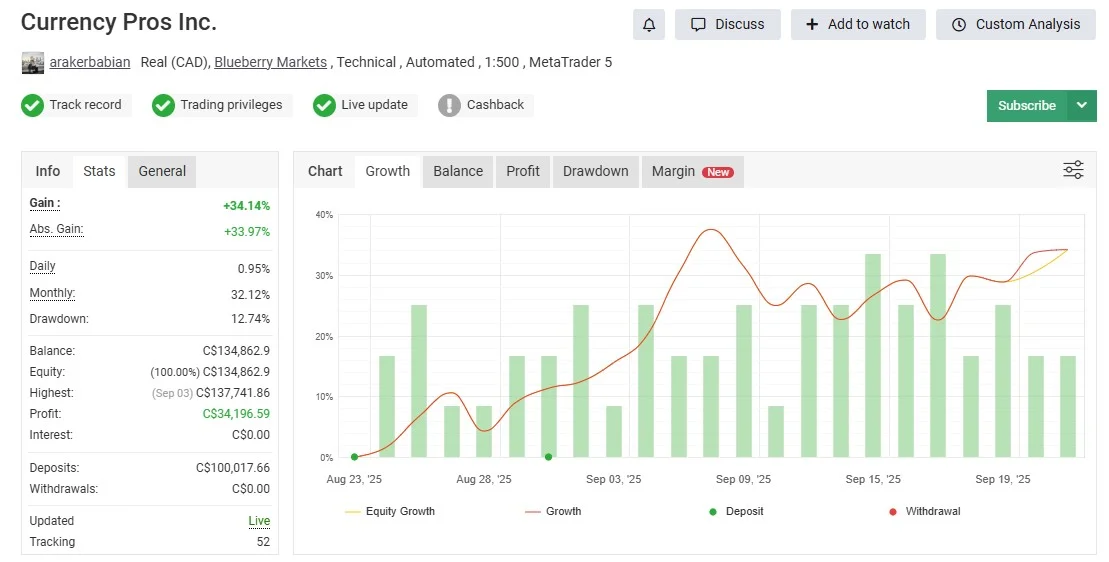
- Whether the seller provides a real public Myfxbook link
- Whether the package is a one-time file download or part of a subscription/community offer
If you skip that step, you can end up optimizing the wrong settings for the wrong build.
Currency Pros EA MT5 Best For
🔹Currency Pros EA MT5 looks like the strongest fit for:
- traders who already understand MT5 and EA deployment
- traders who want a multi-currency forex EA, not a gold-only robot
- users who prefer preset-driven setup over building rules from scratch
- traders who care about avoiding martingale and grid exposure
- prop firm users who want a more controlled risk profile and can verify the rules first
Currency Pros EA MT5 Not Ideal For
🔹It is probably not the best fit for:
- complete beginners who want instant live deployment
- traders who do not want to check broker, VPS, and DLL compatibility
- users who rely only on marketing screenshots
- anyone expecting guaranteed returns from a preset file
- traders who want a fully transparent official documentation trail before paying
Key Features That Actually Matter
A lot of EA reviews list features without explaining why they matter. Here is the practical version.
1. Multi-Currency Coverage
The biggest appeal of Currency Pros EA MT5 is that it is positioned as a multi-pair system. That matters because a trader is not forced to depend on one symbol only. If the logic is sound, multi-pair coverage can reduce the “all eggs in one chart” problem.
2. M15 and H1 Timeframe Focus
Public listings repeatedly mention M15 and H1. That usually means the EA is trying to balance signal frequency with enough structure to avoid random noise.
3. Built-In Risk Controls
🔹This is one of the stronger recurring claims. Sellers repeatedly mention:
- auto lot sizing
- equity protection
- stop-loss logic
- take-profit logic
- safer exposure than martingale/grid systems
That does not prove the EA is automatically safe. But it does mean risk management is part of the product’s positioning, not an afterthought.
4. Prop Firm-Friendly Positioning
Several listings present Currency Pros EA MT5 as suitable for prop firm accounts. That can be useful, but you still need to verify it against the rules of your own firm. “Prop firm compatible” is a marketing phrase until it survives real daily loss, max drawdown, and news-event restrictions.
5. Preset Files
Setfiles are a real advantage when used properly. They make it easier to start with the seller’s intended structure instead of randomly changing inputs on day one.
Currency Pros EA MT5 Settings
This is the section most traders actually need. The open web does not provide one clearly authoritative official settings panel for the generic Currency Pros EA MT5 product. So the safest way to write this is to separate commonly listed settings context from a practical starting framework.
🔷Currency Pros EA MT5 Settings Panel
The Currency Pros EA MT5 settings panel is designed to give traders full control over risk, execution, and breakout logic. Below is a simple, SEO-optimized explanation of the key settings so you can understand how this forex breakout EA for MT5 works in real trading conditions.
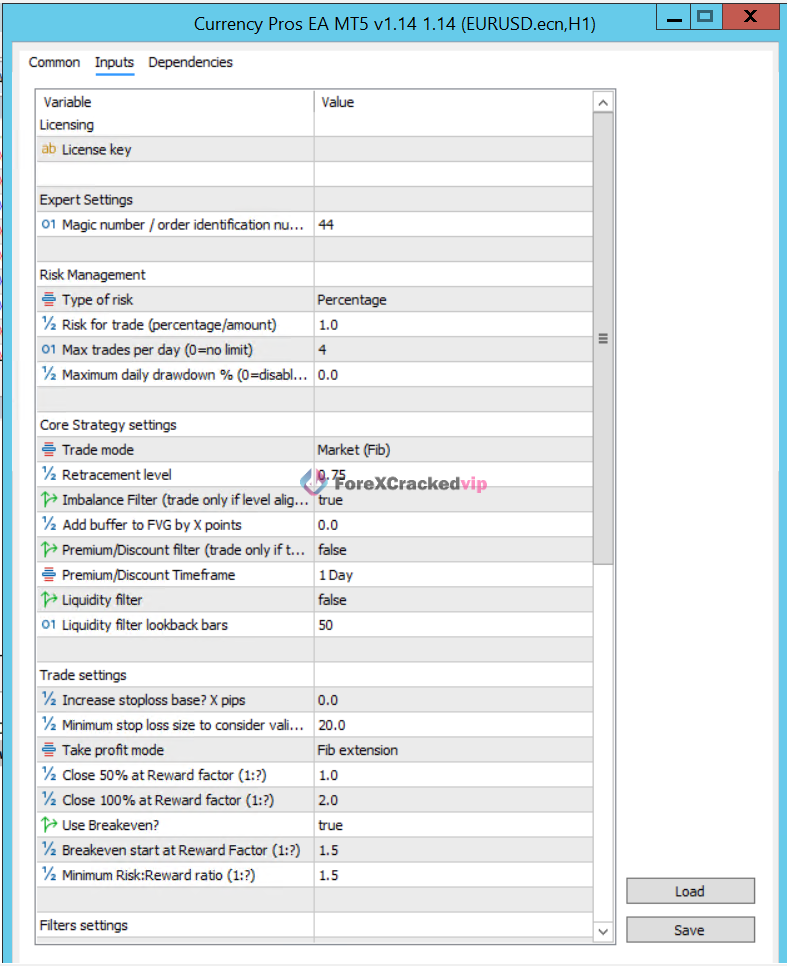
🔹 Licensing & Expert Settings
- License Key → Required to activate the EA (depends on provider).
- Magic Number (44) → A unique ID used by the EA to manage its own trades without interfering with other bots.
👉 Important for running multiple EAs on the same account.
🔹 Risk Management Settings (Very Important)
- Type of Risk: Percentage → Uses account balance to calculate lot size automatically.
- Risk per Trade: 1% → Each trade risks only 1% of your account (safe prop firm approach).
- Max Trades per Day: 4 → Limits overtrading and keeps strategy disciplined.
- Max Daily Drawdown: 0% (Disabled) → No daily stop; can be enabled for prop firm rules.
👉 These settings make it a low drawdown forex EA setup, ideal for funded accounts.
🔹Core Strategy Settings (Breakout Logic)
- Trade Mode: Market (Fib) → Uses Fibonacci-based market structure for entries.
- Retracement Level: 0.75 → Enters trades after a 75% pullback (smart entry zone).
- Imbalance Filter: TRUE → Trades only when fair value gaps (FVG) align.
- FVG Buffer: 0.0 → No extra distance added to entry zone.
- Premium/Discount Filter: FALSE → Disabled (can be enabled for advanced filtering).
- Timeframe: 1 Day → Uses higher timeframe bias for accuracy.
- Liquidity Filter: FALSE → Not using liquidity sweep confirmation.
- Lookback Bars: 50 → Checks last 50 candles for structure.
👉 This shows it’s a smart money concept (SMC) based EA using FVG + Fibonacci confluence.
🔹Trade Management Settings
- Increase Stop Loss Base: 0 → No extra SL padding.
- Minimum Stop Loss: 20 pips → Ensures trades are not too tight.
- Take Profit Mode: Fib Extension → Uses Fibonacci targets for profits.
- Close 50% at 1:1 RR → Secures partial profits early.
- Close 100% at 1:2 RR → Full exit at 2R (good risk-reward strategy).
- Breakeven: TRUE → Moves SL to entry after profit.
- Breakeven Start: 1.5 RR → Activates protection after 1.5 reward.
- Minimum RR: 1.5 → Only trades with good risk/reward ratio.
👉 This makes it a high accuracy breakout EA with strict risk control.
🔹Overall Strategy Summary
The Currency Pros EA MT5 uses:
- Breakout + Fibonacci retracement entries
- Smart money concepts (FVG & structure)
- Strict risk management (1% risk model)
- Partial profit-taking + breakeven logic
This combination makes it suitable for:
- Prop firm challenges
- Low drawdown trading strategies
- EURUSD & Gold breakout trading
🔷Commonly Listed Technical Baseline
🔹Across public listings, the most repeated setup details are:
- Platform: MetaTrader 5
- Pairs: EURUSD, GBPUSD, USDJPY, USDCHF, AUDUSD, and other majors
- Timeframes: M15, H1
- Minimum deposit guidance: around $300
- Suggested leverage range: 1:100 to 1:500
- VPS use: recommended
- Presets: included setfiles
Treat those as seller-side guidance, not universal truth.
🔷Safe Starting Settings Framework
🔹If you want a safer first deployment, this is the better approach:
- Use the seller’s included setfile first instead of creating your own settings on day one.
- Start on demo for at least 2 to 4 weeks.
- Run the EA only on the officially listed pairs from your package.
- Stick to M15 and H1 unless your setfile says otherwise.
- Use the smallest fixed lot size your broker allows before moving to auto-risk.
- Keep risk modest on funded or protected accounts. Low risk usually beats fast disappointment.
- Avoid changing multiple settings at once. If you change lot size, leave the rest alone for that test cycle.
- Use a stable low-latency Windows VPS if you want 24/5 execution.
- If your build requires DLL imports, confirm that your VPS environment supports that safely.
One Critical Setup Warning About DLL Builds
This is important.! If the build you receive uses DLLs, you need to think about VPS compatibility before you go live. According to the published MQL5 Virtual Hosting rules, DLLs are not allowed on their virtual terminal. That means a DLL-based EA may fail on the built-in MQL5 VPS even if the strategy itself is fine.
🔹So the decision tree is simple:
- If your build is NoDLL, setup is easier.
- If your build requires DLL, verify the VPS plan and installation process before you trade live.
That one detail can save a lot of frustration.
A Practical Conservative Deployment Plan
🔹If I were helping someone deploy this carefully, the order would be:
- Install on MT5.
- Attach only to the listed pair and timeframe.
- Load the seller’s preset file.
- Confirm whether Allow Algo Trading is enabled.
- Enable DLL imports only if the package specifically requires it and you trust the source.
- Forward test on demo.
- Check spread, slippage, and trade frequency.
- Move to low-risk live use only after the behavior matches expectations.
That is not the fastest way. It is the way that causes fewer expensive surprises.
Currency Pros EA MT5 Pros and Cons
🔷Pros
- Clear multi-currency MT5 use case
- Repeatedly marketed as avoiding martingale and grid logic
- Preset files can reduce beginner setup mistakes
- Risk management is a visible part of the product positioning
- Public listings suggest support for standard, ECN, and prop-style accounts
🔷Cons
- Product details across sellers are not perfectly consistent
- DLL vs NoDLL confusion is a real setup issue
- Exact official default settings are not cleanly documented in public
- Performance claims online are mostly seller-led
- “Myfxbook verified” only matters if the public link can actually be checked
Currency Pros EA MT5 Values
That matters because you may not be comparing the same thing.
🔹A cheap one-time download can still be poor value if:
- the version is unclear
- support is weak
- the setfiles are outdated
- the Myfxbook proof is not public
- the EA requires DLL-based setup you were not prepared for
🔹On the other hand, it can be decent value if:
- you get the exact current build
- presets are included
- setup support exists
- the seller gives a real verified track record link
- the strategy fits your broker and risk limits
Currency Pros EA MT5 Alternatives
If Currency Pros EA MT5 does not feel like the right fit, the better alternative depends on what you actually want.
- If you want a breakout-focused EA, a product like Currency Pros Breakout EA MT5 is the closer alternative.
- If you want a gold specialist, use a dedicated XAUUSD robot instead of a multi-currency EA.
- If you want simpler infrastructure, look for a NoDLL EA with public results.
- If your priority is lower stress, choose a lower-frequency system over a faster multi-pair setup.
Final Verdict
Currency Pros EA MT5 is not the kind of EA I would call a blind buy. It is more interesting than many low-quality robot pages because the core positioning makes sense: multi-currency MT5 trading, structured risk logic, presets, and no martingale/grid angle. That is a better starting profile than a lot of reckless “100% win rate” nonsense in this niche.
But it also comes with a real buyer responsibility: you have to verify the exact package.
If you confirm the build, the preset files, the DLL requirement, and the proof links, Currency Pros EA MT5 can make sense for traders who want a structured MT5 forex robot. If you cannot verify those things, then the smarter move is to keep looking.
👉Access Unlimited Free EAs HERE!!👈
Frequently Asked Questions (FAQs)
🔷Is Currency Pros EA MT5 good for prop firm accounts?
🔹It can be, but only if the actual build, lot sizing, and trade behavior match your prop firm’s rules. Public listings market it as prop-firm friendly, but you still need to verify max daily loss, total drawdown, news restrictions, and account consistency rules yourself.
🔷What settings should I start with first?
🔹Start with the seller’s preset file, the listed timeframe, and the smallest fixed lot size available. Demo test it first. Do not begin by changing five inputs at once, because then you will not know which change improved or broke the results.
🔷Does Currency Pros EA MT5 use martingale or grid?
🔹Current public listings repeatedly say it does not use martingale or grid logic. That is one of the stronger recurring claims around this EA. Even so, you should still inspect the trade behavior yourself before trusting any marketing label.
🔷Which pairs and timeframes does Currency Pros EA MT5 use?
🔹The most common public listing details point to EURUSD, GBPUSD, USDJPY, USDCHF, AUDUSD, and other major pairs on M15 and H1. Check your own package, because supported symbols can vary by preset or build.
🔷Do I need a VPS?
🔹If you want stable 24/5 execution, yes, a VPS is usually the right move. It becomes even more important if the EA trades multiple pairs. Just verify VPS compatibility first, especially if your build requires DLL imports.
🔷How do I verify a seller’s Myfxbook claim?
🔹Check that the seller gives a real public Myfxbook link. Then confirm whether both Track Record and Trading Privileges are verified. Myfxbook treats those as separate verification signals, and that distinction matters.
🔷Is Currency Pros EA MT5 beginner-friendly?
🔹It is beginner-friendlier than many raw manual systems because it uses presets and automation, but it is not truly beginner-proof. A new trader can still damage an account by using the wrong broker, wrong lot size, or wrong VPS setup.
Articles You Must Read
🔹Manual Trading vs Forex EA: Which Is Better in 2026? | Keep Reading
🔹Forex Robot Risk Management Guide for 2026 | Keep Reading
🔹Quantum Queen MT5 EA vs TPC Bot MT5 EA: Which One Is Better? | Keep Reading
Unlimited Choices, Unlimited Downloads – Free for VIP Members
If you want a multi-currency MT5 EA, check the exact build, setfiles, and Myfxbook link first, then decide whether Currency Pros EA MT5 fits your risk style. Before going live, compare Currency Pros EA MT5 with a breakout-focused alternative and make sure your broker, VPS, and prop firm rules match the setup. Use this review as a filter, not a shortcut: verify the package, start on demo, and only move to live trading when the results match the claims.
Ready to level up your trading game with powerful gold trading tools for MetaTrader 5? Download premium trading robots like Quantum Queen EA MT5, TPC Bot EA MT5, Beast Scalper EA MT5, GoldenHour EA MT5, Golden Mirage EA, and Mad Turtle EA MT5 instantly from our website and start optimizing your trading strategy today.
Want Unlimited Access to 500+ Premium Forex Robots?
👉Join Our VIP Membership Today
As a VIP Member, You’ll Unlock:
🔹Unlimited EA downloads
🔹Access to premium trading indicators
🔹Lifetime membership access
🔹Weekly updates with new tools and improvements
🔹Fast-track priority support
Don’t just trade. Trade smarter.
Become a VIP and gain a stronger edge in the forex market 💎
Best EAs Settings & Reviews
🔹Quantum Queen EA MT5 Review & Settings – Most Powerful Gold Trading Robot? | Keep Reading
🔹XAURON EA MT5 Review & Settings – Best Gold Trading EA for XAUUSD? | Keep Reading
🔹TITANY AXI PRO EA MT4 Review & Settings – Smart Multi-Pair Correlation Trading? | Keep Reading
Free Support & Trading Resources
🔹More Updates About EAs Connect US on Telegram
Disclaimer
The content in this article is provided for educational and informational purposes only and should not be considered financial, investment, or trading advice. Forex, gold, and automated trading involve substantial risk, and losses can exceed expectations depending on market conditions and risk settings. Any references to Quantum Queen MT5 or other expert advisors are based on general analysis, features, and opinions, not guarantees of future performance. Past results do not guarantee future returns. Always do your own research, test any EA on a demo account first, and consult a qualified financial advisor before making any trading decisions.
Affiliate Disclosure
Some links in this article may be affiliate links. This means we may earn a commission at no extra cost to you if you purchase through those links. This helps support our content, and we only promote products or services that are relevant to our audience.